Skip to content
The Mode Encore

The Mode Encore

65% layout. Natural hardwoods. Crown Mounting System.

Where Wood Meets Metal

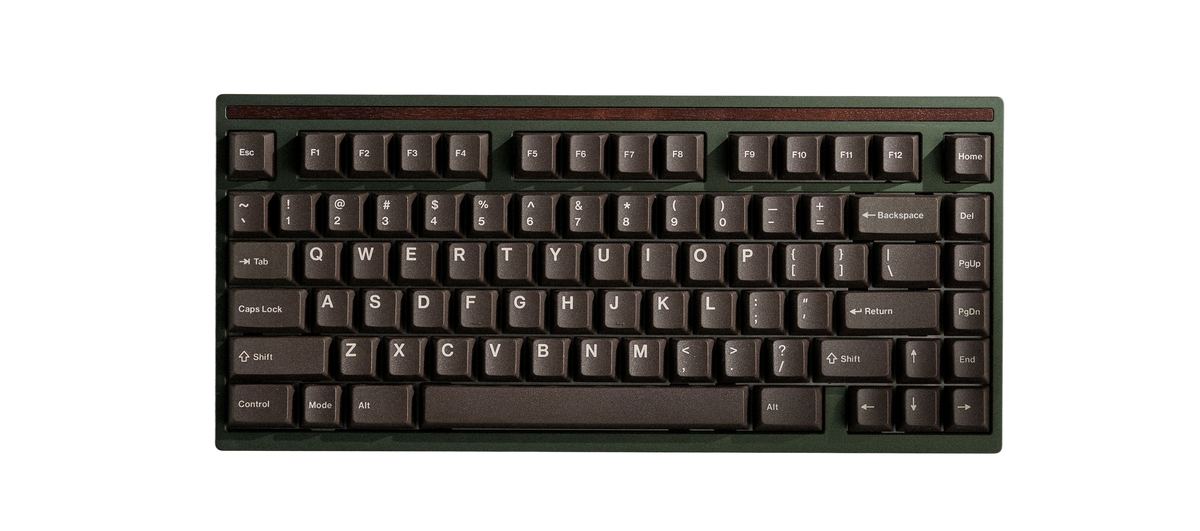
Thick bezels, a chamfered cherry-style front edge, and natural hardwood accents — redesigned for 2026 with the Crown Mounting System inside.

Explore the Mode Encore

Mode Encore 65% mechanical keyboard side view showing contrasting wood and aluminum materials

Works with

macOS, Windows, Linux

Superior Feel

Using our new Crown Mounting System

Easy Key Mapping

With QMK + VIA Firmware

Tune Your Sound

Swap plates, switches, and mounts

The 65% Layout

The 65% Layout

A 65% mechanical keyboard uses roughly 65% of the keys found on a full-size board. It drops the function row, nav cluster, and numpad while keeping dedicated arrow keys. This is as compact as you can go before needing to learn new typing patterns. The Encore's take on this layout is understated but not boring with elements like the prominent top accent and cherry-lip.

The Encore draws inspiration from classic mechanical keyboards with thick bezels and a chamfered cherry-style front edge. These familiar forms are reimagined with contrasting materials and refined lines, creating a striking yet minimal profile on your desk.

Hear Encore

Listen to Encore with different switches and plates. Each build in this video uses the Crown Mounting System without foam, so you can hear how the components shape the sound.

Recordings are a reference. Sound will vary with your build, setup, and listening equipment. The video features the original 2026 launch configurations.

Details & Specs

Crown Mounting System

The Crown Mounting System connects the plate and PCB assembly to the chassis using a wave spring, a silicone spool, and a bushing, stacked on a custom shoulder bolt at each of the 8 mounting points.


Crown Fastener

Anchors the entire assembly to the top case with a hard stop, ensuring consistent compression every time. The form is inspired by a watch crown, the knob used to set the time, and can be finger-tightened without tools.


Silicone Spool

Cradles the spring and acts as the damper, controlling contact points and reducing vibration before it reaches the case.


Wave Spring

Provides the “spring” in the system, delivering a snappy return while taking up less vertical space than a traditional spring.


Bushing

The low-friction interface between the mount and plate, keeping movement smooth and guided without binding or chatter

Encore keyboard exploded view showing all components

Designed by Us.
Built By You.

The Encore ships as a kit. You pick the plate, switches, and keycaps, then put it together yourself. It's a straightforward build — hotswap PCB, no soldering.

Once it's built, you can swap switches anytime to change the sound and feel. Most people end up trying a few combinations before they land on their favorite.

We have written and video build guides, and our Discord community is genuinely helpful if you get stuck or want advice on what to try.

A closer look at the 2026 collection

Explore the colors, materials, and finishes behind the 2026 Encore and Sonnet. In this video, we walk through the original launch configurations and the choices that shaped each one.

This video features the original 2026 launch collection. Current configurations may differ.

FAQ

Encore is Mode’s 65% mechanical keyboard. Its split-top design pairs classic keyboard details with a mix of materials, and its customizable build lets you shape the sound and feel.

A 65% keyboard keeps the main typing keys and dedicated arrow keys in a compact layout. Encore does not have a dedicated F-row or numpad; you can access function keys through a secondary layer.

Encore is for people who want a compact keyboard with dedicated arrow keys and room to customize its appearance, sound, and feel. Its 65% layout leaves more space on the desk while keeping frequently used keys close.

Hold the Fn key and press the corresponding number-row key to access F1 through F12. You can view and remap the keyboard’s layers in VIA.

Crown Mounting System connects Encore’s plate and PCB assembly to the case using eight mounting points. Each uses a wave spring, silicone spool, bushing, and shoulder bolt to support a responsive, comfortable typing feel and help control vibration.

Yes. Encore includes Crown Mounting System and supports optional top-mount bolts for a firmer typing feel. Top-mount bolts are sold separately.

Encore’s sound and feel depend on the complete build, including the mounting system, plate, switches, keycaps, and any foam you choose to use. Listen to the sound tests above for examples of different builds.

Yes. Choose your configuration, plate, switches, and keycaps to make Encore your own. You can also adjust its sound and feel with optional foam and mounting hardware, and customize the keymap in VIA.

Encore works with MX-compatible switches and keycaps. Make sure your keycap set supports your chosen 65% layout and bottom-row sizes, including your spacebar.

Encore is available with a hot-swap PCB, which lets you install compatible switches without soldering. A solder PCB requires soldering, so check the PCB option you select when ordering.

The Encore kit includes the case, PCB, plate, daughterboard, Crown Mounting System, feet, fasteners, and assembly tools. Check your selected configuration for the exact contents.

You’ll need compatible stabilizers, switches, and keycaps to complete your build. These are not included in the base kit, so you can choose the parts that suit your preferences.

No. Encore is a wired keyboard that connects over USB-C.

Yes. Encore works with macOS and Windows. On a Mac, you can switch the Command and Option key positions in system settings to match your preferred layout.

Yes. Encore supports QMK and VIA, so you can customize key mapping and layers. Some 2026 PCBs may require you to load a definition file in VIA; the Encore build guide explains how.

The Encore build guide walks through assembly, setup, and tuning step by step.